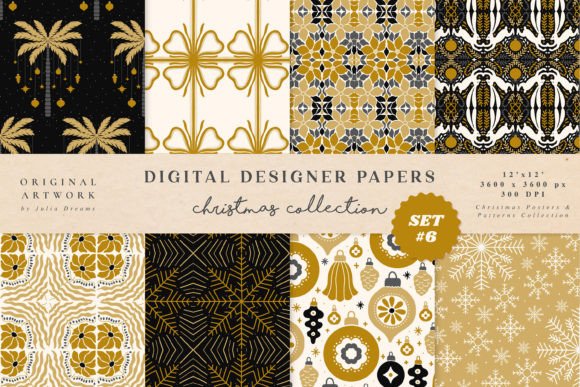
Gold New Year Digital Papers Patterns
Gold New Year Digital Papers Patterns are more than festive background textures—they’re production-ready design assets built for consistency, versatility, and professional output. Each pattern in this curated set of 8 hand-painted digital papers is crafted with intention: seamless tiling, precise resolution, and multi-format compatibility ensure they integrate smoothly into real-world creative workflows. Whether you’re finalizing a client’s holiday branding package, prepping social media content for Q4 campaigns, or designing custom stationery for a small business launch, these patterns serve as foundational elements—not decorative afterthoughts.
Where These Patterns Fit in Your Creative Process
Think of Gold New Year Digital Papers Patterns as infrastructure. Like choosing the right paper stock before printing wedding invitations—or selecting a consistent color palette before building a brand system—these patterns establish visual tone early, reducing revision cycles later. They’re most effective when introduced during the asset-planning phase: before mockups are locked, before templates are shared with stakeholders, and before bulk production begins. That timing allows you to align typography, iconography, and layout decisions around the gold texture’s warmth, grain, and scale—not the other way around.
For example, a freelance graphic designer preparing a New Year planner series might start by testing all 8 patterns against their chosen font hierarchy and icon set. Doing this upfront reveals which patterns support legibility at small sizes (like on sticker sheets), which hold up best in large-scale wall art prints, and which translate cleanly to fabric or foil-stamped packaging. That kind of evaluation isn’t possible if patterns are added as last-minute “sprinkles.”
Format Flexibility Supports Real-World Output Needs
The inclusion of both raster (.jpg, .png) and vector (.ai, .svg, .eps) files means Gold New Year Digital Papers Patterns adapt to your tools—not the reverse. Raster versions at 3600 × 3600 px (12 × 12 inches, 300 dpi) deliver crisp results for print-based applications: greeting cards, wrapping paper, posters, and physical invitations. Vector formats preserve scalability for logo backgrounds, web banners, or SVG-based interactive elements—no pixelation when resizing across devices or screen densities.
This dual-format structure eliminates common bottlenecks. A marketing manager updating a Shopify store’s New Year sale banners doesn’t need to re-export or resample. They drop the .svg directly into Figma or Adobe XD, adjust opacity or blending mode, and export optimized assets for desktop and mobile views—all without quality loss. Similarly, an educator creating printable classroom decorations can open the .png in Canva, layer student names over the gold texture, and download ready-to-print PDFs in seconds.
Practical Integration Across Common Tools and Platforms
Compatibility extends beyond file types—it’s about how easily these patterns slot into daily software use. In Adobe Photoshop or Affinity Photo, the seamless nature means one click applies a pattern fill layer that tiles infinitely across any canvas size. In Illustrator or InDesign, the .ai and .eps files function as native swatches or pattern libraries, letting you apply them to text outlines, shape fills, or entire master pages with precision.
For non-designers, the .png versions work reliably in Canva, Google Slides, and Microsoft PowerPoint. Upload once, save as a brand asset, and reuse across presentations, email headers, or social media story templates. Bloggers embedding patterns into WordPress themes can use the .svg version as a CSS background image—lightweight, responsive, and accessible without loading heavy JPEGs.
Even physical production benefits: crafters using Cricut Design Space or Silhouette Studio import the .svg files directly to cut gold-foiled vinyl decals or layer patterns behind die-cut stickers. The 300 dpi resolution ensures clean edges when printed on adhesive paper or heat-transfer vinyl.
Workflow Efficiency Starts With Organization
Before opening any file, take five minutes to organize. Create a dedicated folder named “Gold New Year Digital Papers Patterns” and subfolders labeled “Raster,” “Vector,” and “Usage Examples.” Rename each file clearly—for instance, “gold-newyear-pattern-03-seamless-3600px.jpg” instead of “IMG_1234.jpg.” This prevents confusion when pulling assets for multiple clients or seasonal campaigns across years.
Within design tools, build reusable libraries. In Figma, create a “New Year Textures” page with all 8 patterns as auto-layout frames—label each with its format and recommended use case (e.g., “Pattern 5 — Best for dark text overlays”). In Adobe Creative Cloud Libraries, add the .png and .svg versions side-by-side so team members can choose based on context—not guesswork.
Quality Control and Long-Term Usability
Because these are hand-painted—not algorithmically generated—the patterns carry subtle variation: slight shifts in gold tone, organic brushstroke texture, and nuanced light reflection. That authenticity elevates perceived value but requires attention during implementation. Always preview patterns at 100% zoom before finalizing layouts. What reads as rich and dimensional on screen may appear too busy when printed on matte paper or viewed on low-resolution displays.
Test across outputs early: print a 4 × 6 inch sample on your target paper stock, export a social post at actual Instagram dimensions (1080 × 1080 px), and view a web banner on both Chrome and Safari. Note where contrast drops or detail blurs—and swap to a simpler pattern from the set if needed. Pattern #2 and #7 tend to perform best for text-heavy applications; #4 and #8 shine in large-format, minimal layouts.
Use Cases That Extend Beyond the Obvious
Yes, Gold New Year Digital Papers Patterns work beautifully for greeting cards and invitations—but their utility stretches further. Consider:
- Branding systems: Use one pattern as a background for a “limited edition” product label, then simplify it into a monochrome line-art version for secondary packaging.
- Educational materials: Layer a subtle gold pattern behind key learning objectives in a workshop handout—it adds visual weight without distracting from content.
- Digital planners: Apply Pattern #1 as a weekly spread background in Notion or GoodNotes, then use Pattern #6 for monthly cover pages to create rhythm and hierarchy.
- Website headers: Export a cropped section of Pattern #5 as a fixed-position background image behind a hero headline—its seamless nature avoids visible repeats even on ultra-wide monitors.
- Client onboarding: Include one pattern as the background of your welcome PDF—subtle gold signals premium service before the first meeting begins.
Making the Most of All Eight Patterns
Don’t default to “using them all.” Instead, assign purpose. Pick two as your primary working patterns—one warm-toned (e.g., Pattern #1 or #3), one cooler or more neutral (e.g., Pattern #6 or #8). Reserve the remaining six for specific contexts: one for print-only projects, one for social-first assets, one for dark-mode interfaces, and so on. This approach maintains cohesion while allowing flexibility.
Also, track usage. Keep a simple log: date, project name, pattern used, format selected, and outcome note (“Used Pattern #4 .svg in Instagram carousel—engagement +12% vs. flat background”). Over time, you’ll identify which patterns consistently deliver clarity, emotional resonance, or conversion lift—making future selections faster and more confident.
Gold New Year Digital Papers Patterns aren’t about adding decoration. They’re about reinforcing intention—through texture, tone, and technical readiness—at every stage where visual communication matters.